Custom Search
Showing posts with label ITalk Whoa. Show all posts

Monday, November 22, 2010

RSS Feeds in iTalk Whoa!

For us active user of the Internet, we like to keep up to date to the online news and blogs that we read. Someone created RSS (Really Simple Syndication) Feeds so that updates can be receive without us having to surf the website or blog everyday to check for updates. Some of us put the RSS Feeds on our blog or add it to the web browser. I find this kind of making my blog or browser cluttered with RSS Feeds. I read a lot of blogs mind you lol.
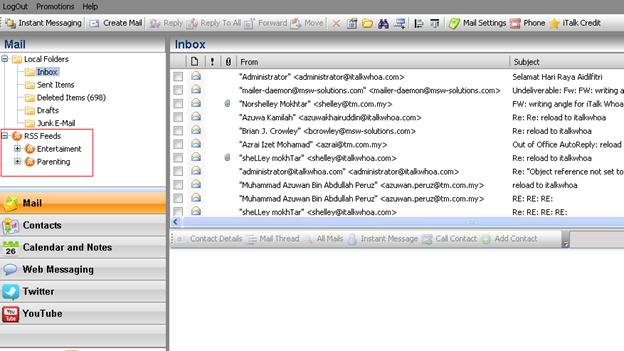


Well now I don't have to clutter my blog or browser. All I have to do is login to my iTalk Whoa! portal and add my favourite website or blog RSS Feeds and voila, my personal RSS Feeds portal.

Here's a short tutorial on how to add RSS Feeds to your iTalk Whoa! portal.
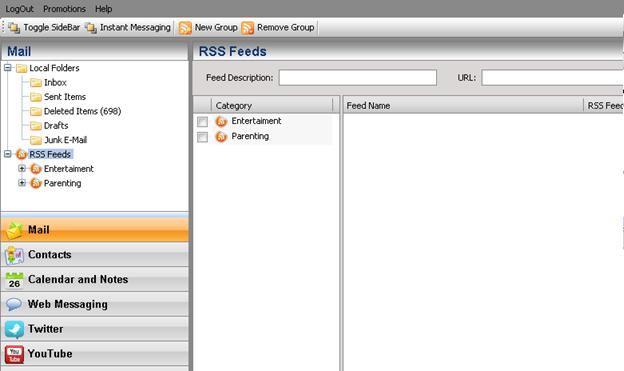


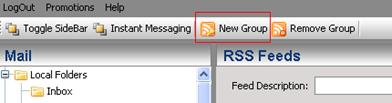
Select the RSS Feeds under Mail panel and click on New Group to create a new category/group


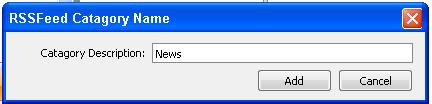
Pop up box [RSSFeed Category Name] will appear and please input any name for the new group – example News


Then click on button [Add]
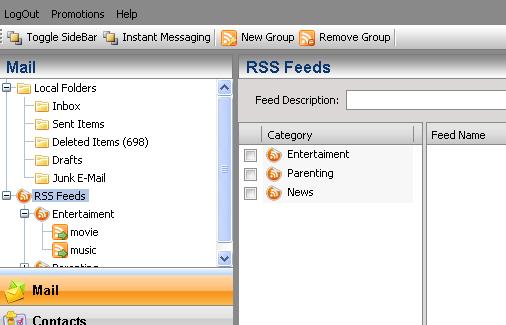
Automatically the News Feeds will appear in current Category Panel as below:


To input any info on News category, just search for RSS News that interest you. In the example, the feeds gather from The star newspaper.
Just go to the The Star Url - http://thestar.com.my/
Scroll further down till the end of the webpage and you will see image as below:
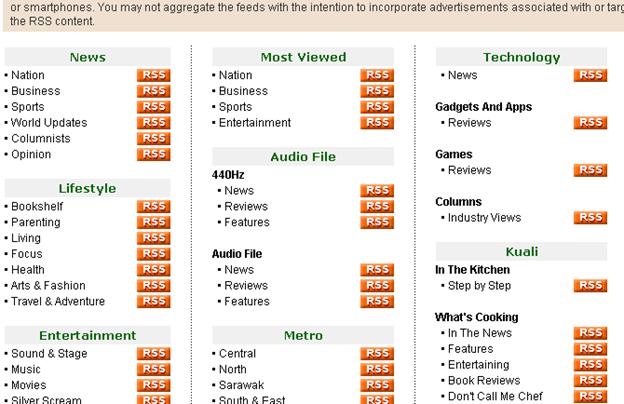


The RSS icon placed on the right side and click on it –
You may input or place any RSS in iTalk Whoa! for any website that have the RSS icon
You may get RSS Feeds from:
• Any newspaper – The star [http://thestar.com.my/rss/]
• At PC/Entertainment website – Apple [http://www.apple.com/rss/]
• At blogger website

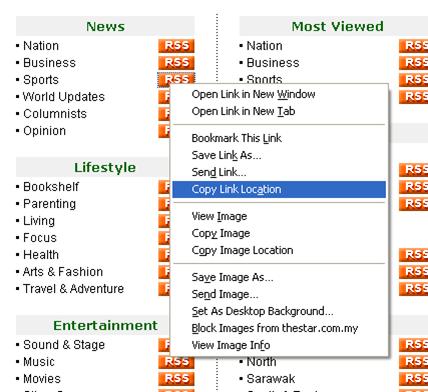

Shown above the link for RSS Feeds in The Star newspaper. Thus you can just choose any topic that interests you the most. In this example, Sport under News been selected.


Just right click on the RSS icon besides the Sport News and select ‘Copy Link Location’.
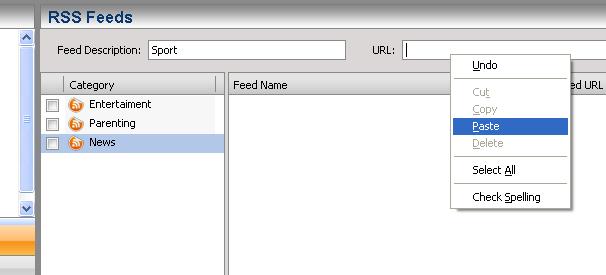


Go back to your iTalk Whoa’s account and highlight the News icon, input ‘Sport’ under ‘Feed Description’ and paste the url copied previously.
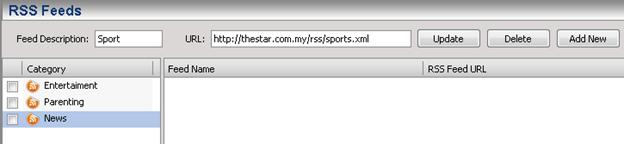


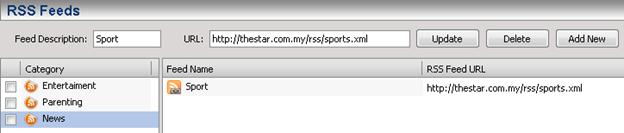
The Sport RSS url will appear and click ‘Add New’ button and the Sport RSS will appear in the Feed Name Box as below:


To view all the RSS Feeds for sport, just click on Sport under News at the Mail Panel:
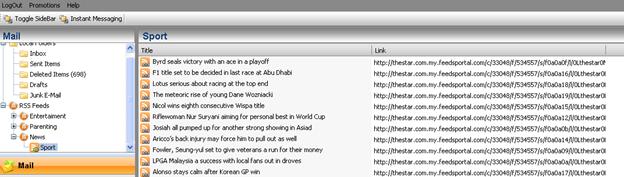
All the Sport highlights will be display in split second and you can just click on any link to read/view the full story of the day.

Notes:
Sometimes, the link create does not appear immediately. Thus user needs to wait for a few minutes before the link to appear. Or user may logout and login again into iTalk Whoa! to view the link.

Voila. Now I can uncluttered my browser or blog from RSS Feeds and move them to iTalk Whoa!


Monday, September 6, 2010

More Value for iTalk Card Top Up During Raya

Hari Raya is just around the corner. Most of my Muslim friends would have friends or family that is studying or working overseas and can't come back to celebrate Hari Raya. With telecommunication technology so advance right now, it's very easy to make a call to you loved ones oversea.


Not only that it's fast but now with iTalkWhoa Raya promotion, it's more value added to make calls to oversea. You see, in conjunction with Ramadhan and Aidilfitri, starting from 1st September 2010 until 31st October 2010, enjoy 20% ADDITIONAL talktime automatically credited into your account if you activate/reload your iTalk card from 1st September 2010 until 31st October 2010.

Now you can talk more with the same amount of top up.


There is more from iTalk, TM online contents can now been purchase using iTalk. Please visit website below:
•    HyppTunes (www.hypptunes.com.my)
•    E-Browse (www.ebrowse.com.my)
•    B-SmartXpress (www.bluehyppo.com)
•    Gamezone (www.hyppgames.com.my)
•    MUTV online (www.hypp.tv/manutd)

Lastly, I wish you all Salam Aidilfitri, Maaf Zahir dan Batin.


Monday, July 19, 2010

It's A Good Time To Make Long Distance Call

Do you have friends and family that is staying overseas? Sister or brother that is studying in United Kingdom? Boyfriend or girlfriend doing his/her final year in Australia? Maybe even a girlfriend that's working in USA as a nurse? You son or daughter is transferred to China for one to two year to complete a project?

To keep in touch with people in long distance, of course the free way is to use chat like MSN or GTalk. The normal IDD call will cost us a bomb. But keeping in touch using only text and without hearing the voice of the love ones can be quite hard, especially if it is a long distance relationship.

Well, fear not because from 15th July 2010 till 31st Dec 2010 is a time to make long distance call like never before. All this thanks to TM iTalk Whoa. Now making call using TM iTalk Whoa to the countries below will enjoy a promo rates.


Anyone can enjoy the promotion as long as you've registered as a iTalkWhoa user. It's not only that, not only one can make call from Malaysia to China, U.S.A, U.K, Canada or Australia but the person from China, U.S.A, U.K, Canada or Australia can make calls using TM iTalk Whoa with the same promo rate back to Malaysia. Why not? TM iTalk Whoa is a web based portal after all.

What are you waiting for? You have anyone you want to contact in China, U.S.A, U.K, Canada or Australia? If yes, then faster register yourself now on www.iTalkWhoa.com and make low rates long distance call to China, U.S.A, U.K, Canada or Australia.


Friday, April 16, 2010

TM iTalk Whoa Launching

Just a night before I went to Bali, I went to the launching of TM iTalk Whoa! which I've blogged about here. So at the launching event, we learned more about TM iTalk Whoa! TM is so generous that in the goodies bag it's a headphone-mic set so that we can call using our laptop to any country with a very low call rates using the TM iTalk Whoa portal.


Nice headphone-mic set courtesy of TM.


MC of the night warming up the crowd first before that start of the launching.


The "birthday boy" then told the crowd what is iTalk Whoa all about. It is actually what TM called Connect, Communicate and Collaborate. In iTalk Whoa portal, you can CONNECT with all your contacts using different social networking tools such as Facebook and Twitter just in one place.

It also let you COMMUNICATE with your friends and family that are using different type of chat program such as MSN, Yahoo! Messenger or Gtalk just in one portal because you can add in your different chat account and integrate within TM iTalk Whoa. Not only that, you'll also be able to use the VOIP service to call your friends and family that is oversea with a fraction of what your IDD call will cost you.

Last but not least you will be able to COLLABORATE, share all your videos, pictures and thoughts with your friends and family just in one place and one account. Now that's what I call collaboration.


"Birthday Boy" giving the launching speech.

Okay. Back to some fun and games. We have here to move ice cube from one glass to another glass and then filled it up with orange juice. The one whom is the fastest will get a prize. I joined the 2nd round too but alas all of us guys lost to Haze. I blamed my big hand and the small glass.


Eric and Terrence hard at "work".

After the games, we were all entertained by Bunkface. They are very popular now, don't play-play. The crowd went crazy with Bunkface rocking the house down. You can always count on TM to put on a good event.


Bunkface rocking their hearts out.


Ah, the music might be too loud for the kids.

Rock and roll was interrupted half way because it's time to sing birthday song and cut the birthday cake. Guess who's birthday it is?


Do you want Bunkface to sing birthday song to you too?


Well, that night was really fun and informative. During the Q&A session. One of the question is "Why TM iTalk Whoa can only be use on Internet Explorer?" Well, the fact that 90% of the OS in the market is Windows and Windows comes with IE. So, we can safely says that everyone will have IE and will be able to use the services provided from TM iTalk Whoa portal. Common sense. The team from TM iTalk Whoa will continue to improve the portal and make it compatible with other browsers in the near future. They promised.

Met a lot of old and new faces there. I'll just show those that I met for the first time that night.


Ceddy. I've been reading his blog two years ago but didn't meet him before.


Okay. That's the launching. Next I'll blog about how iTalk Whoa saves me in Bali when I forgot to bring my mobile phone to Bali.


Tuesday, April 6, 2010

Introducing ITalk Whoa!

There's a new portal in town. It's the ITalk Whoa! brought to you by TM.


So what is it all about?

Well, in ITalk Whoa! there's a Webmail. You'll say, webmail quite normal. Ah, there's the thing, you can integrates major webmail services such as MSN, Yahoo! and Gmail. So, I can view different webmails in just one portal. I can also check your corporate email because it can integrate with standards compliant corporate email servers.

Best of all, it has Push eMail feature. I can enable my email to be push to my mobile phone with real-time true push of emails & attachments. It works with any mobile device without the need of a local client.

Integration of all my Instant Messaging. I'll be able to integrate multiple chat servers into just one IM Chat. It also has the capability of Desktop to Desktop or Desktop to Mobile collaboration. What more, ITalk Whoa! even has it's own Tweeting application. Something different rather than using the web Twitter lol.


The Twitter interface in ITalk Whoa!

This is after all a ITalk Whoa! portal, which means I'll be able to make Voice Call from your PC with the lowest calling rate. Imagine I can call back home to Malaysia with very low rate by using your PC when you are oversea. For example, calling to a Hong Kong fixed line using the portal only cost RM 0.06 per minute. Crazy, now I can call my cousin Elaine in Hong Kong and talk for very long whenever I like without worrying about the cost. You'll be able to send Web SMS too trough the portal and it can be send to any phone (local mobile/international mobile/fixed sms).

These are just some of the features available in ITalk Whoa! I am still exploring the portal. So will post more updates soon on my exploration. But don't wait for me to post my updates, go and register yourself in ITalk Whoa! now. I got RM 5 credited to the ITalk Whoa! account just by registering myself to ITalk Whoa!. I can already starts making long distance call using my PC just by registering. Makes me want to shout Whoa!